How I Turned Newsletters Into an AI Knowledge Base on a $7 VPS
How I use the Hermes AI agent and Telegram to move newsletters out of my primary inbox and turn them into a searchable knowledge base.
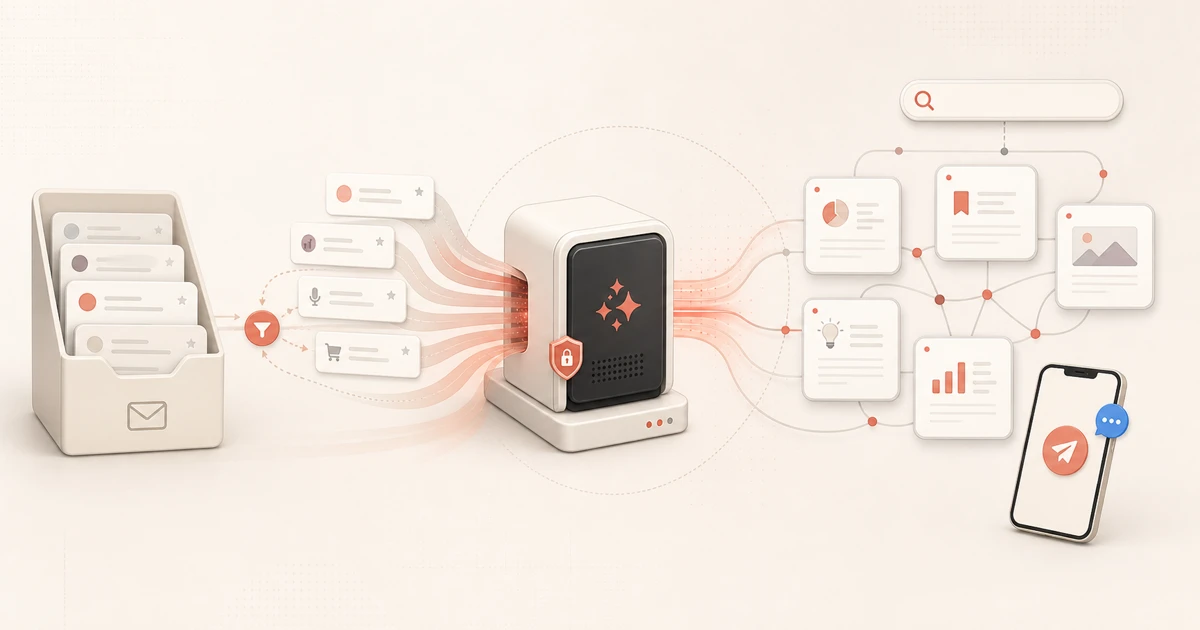
I subscribe to more newsletters, Substacks, and alerts than I can reliably digest. They feed ideas for content, market research, and new products, but they also crowd the same inbox where leads and time-sensitive messages arrive.
Unsubscribing from everything would make the inbox quieter, but it would also discard a valuable stream of content. So I moved those non-critical emails to their own destination—and handed that reading queue to an AI agent. The result is both an inbox filter and a research pipeline. Instead of being overwhelmed by a constant flow of information, I preserve useful material for content generation, project research, and future automated workflows.
A Gmail filter forwards newsletters and similar periodic emails from my primary inbox to a secondary account. Twice a day, Hermes reads the new messages, summarizes and tags them, and adds them to a private, searchable knowledge base. Telegram tells me when the job is done.
One clarification matters: Hermes does not have access to my primary inbox. The triage happens before Hermes enters the picture. Important correspondence stays in the primary inbox; Hermes processes only the lower-risk stream routed elsewhere.
The Problem Was Inbox Noise and Lost Research
I split my time across HalalCodeCheck, GOMDecom, and other personal and client projects. That means researching very different markets and following useful ideas across newsletters, feeds, videos, and communities.
The problem isn’t a lack of information—it’s retrieval. A newsletter I read today can be almost impossible to find three months later, exactly when a project or article needs it.
Moving those emails fixes the interruption problem; turning them into a knowledge base fixes the retrieval problem. The agent extracts the useful points, assigns topics, and stores the source. I decide whether an idea matters to a client, product, or article.
How the Pipeline Works
The flow is deliberately simple. Routed emails land in a secondary Gmail account. A scheduled Hermes workflow summarizes, tags, and embeds them into a private knowledge base. The dashboard exposes the results, and Telegram reports the job status.
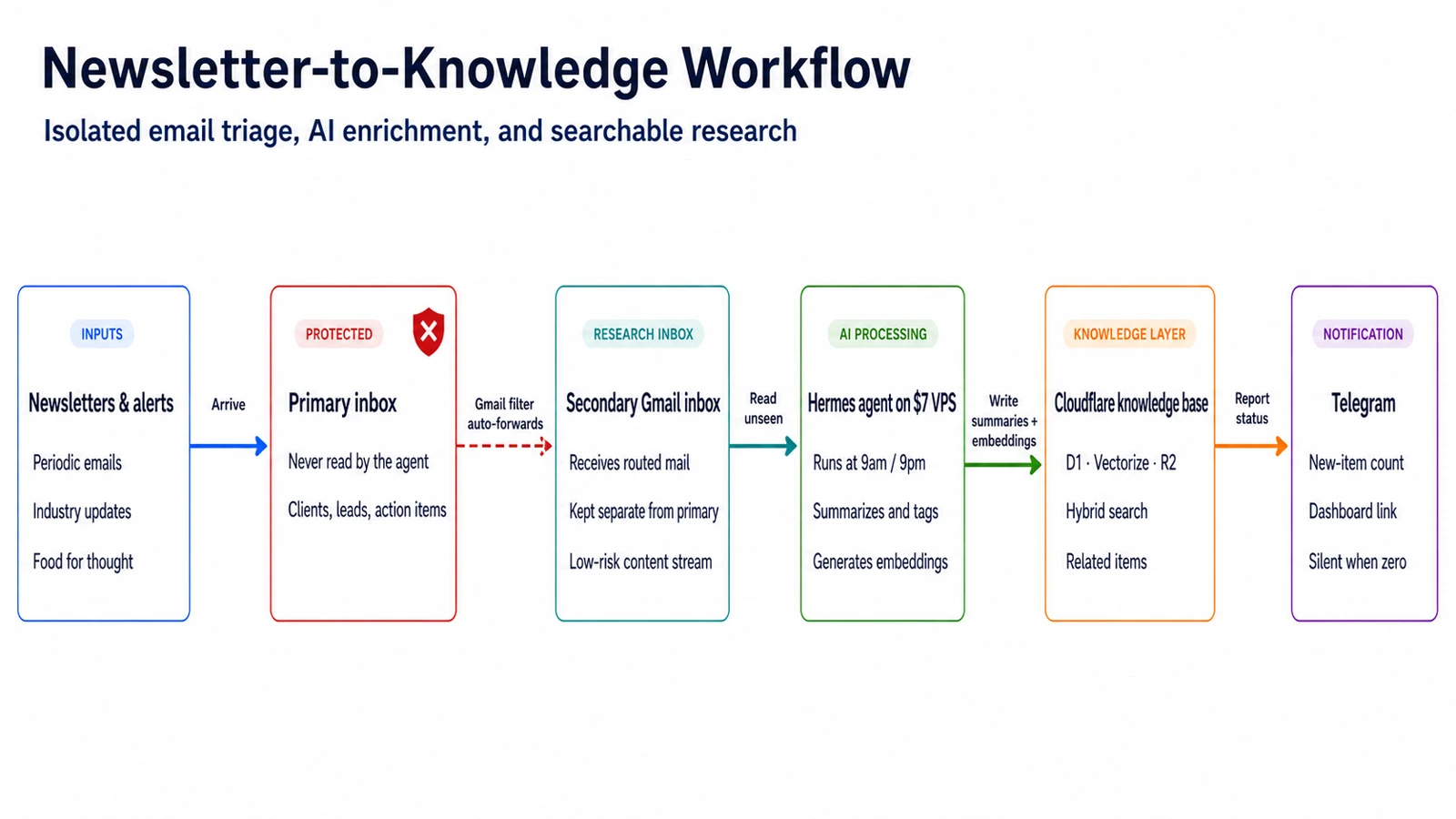
Two scheduled jobs run each day.
The ingestion job runs at 9am and 9pm. It reads unseen messages in the secondary account, extracts the useful content, creates a summary and tags, generates an embedding, and pushes the result into the Cloudflare knowledge base. It also records the job status so I can see what succeeded and what failed.
The notification job runs an hour later, at 10am and 10pm. It sends one Telegram message with the number of new items and a link to the dashboard. If nothing new arrived, it stays silent.
The design principle is to push the minimum and let me pull the detail when I want it. A digest of every summary would just replace one inbox with another. Telegram tells me that new material exists; the knowledge base holds the material itself.
The Stack: Boring on Purpose
The system has five main pieces:
- A $7 Contabo VPS running Ubuntu, with key-only SSH, a restrictive firewall, Tailscale, and fail2ban.
- Hermes, the open-source agent framework from Nous Research, running as a systemd service. It handles the agent loop, tools, and scheduled workflows.
- A dedicated Gmail account that receives the stream routed out of my primary inbox.
- A Telegram bot as the control surface for job notifications and, eventually, conversational research.
- A Cloudflare Worker backed by D1 for structured data, Vectorize for semantic retrieval, and R2 for stored assets. Cloudflare Access keeps the dashboard private.
DeepSeek v3.2 through OpenRouter is the default model. The VPS is the fixed $7 monthly cost; model usage varies with how much material the system processes. The Cloudflare components currently fit within free-tier-friendly usage.
Cloudflare Workers also power my email delivery workflow, so the stack was familiar. There is no orchestration subscription and no separate hosted vector-database bill. More importantly, every component has a narrow, visible job. That makes the system easier to understand when something inevitably fails.
The Dashboard Became a Research Tool
The dashboard started as a status page with a searchable dump of the knowledge base underneath. I assumed I would open it to check whether the morning job had run. Instead, I used it to explore what the newsletters had brought in and find ideas for projects and articles.
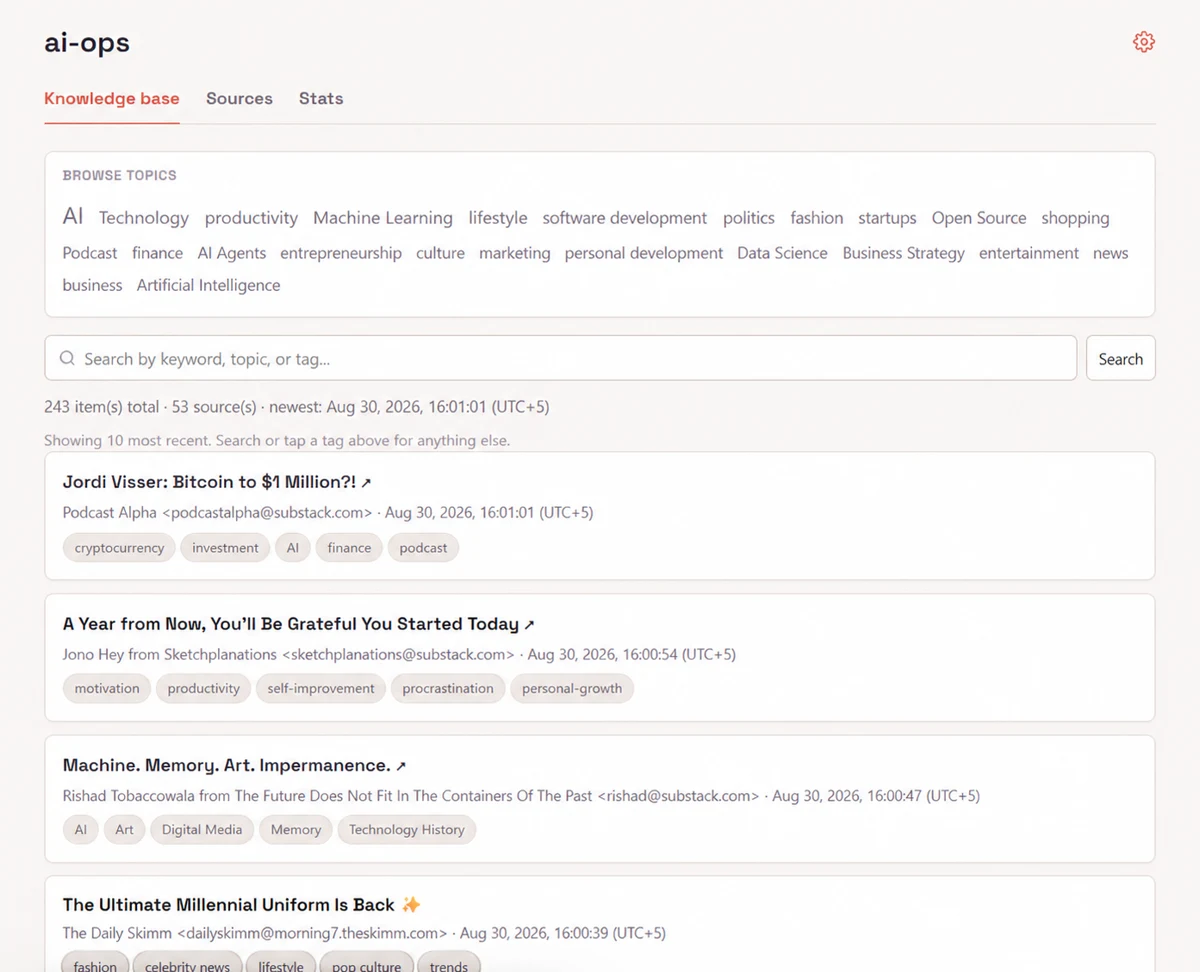
So the knowledge base became the home page, and operational status moved to a secondary Stats tab. Hybrid search combines exact keyword matching with semantic retrieval, and related items resurface older material connected to whatever I’m reading—one new newsletter can bring back three relevant pieces I’d forgotten. The status page was built for the system; the research tool is built for me.
Two Lessons From Building It
Constrain the Task Before Upgrading the Model
DeepSeek was unreliable when it had to improvise a multi-step chain of tool calls: pick the right emails, call the right APIs, in the right order. Moving those API operations into a defined Hermes skill fixed it. The model now handles only summarization and classification, and the same cheap model became dependable.
The lesson: a constrained workflow reduces how much intelligence the model needs to supply. Narrow the task before upgrading the model.
Test the Delivery, Not Just the Configuration
Two failures taught me this. A Telegram job reported success while its message went nowhere—no delivery destination was configured. And fail2ban ran correctly while its email alerts silently failed, because the server had no mail transfer agent.
My rule now: forward a real test email, trigger the real workflow, confirm the item appears in the knowledge base, and watch the Telegram message arrive. A successful command is not the same as a successful system.
What’s Next: From Ingestion to Research
The first phase proved that Hermes can turn a controlled stream of non-critical email into organized, searchable material. Next I want to:
- Conversational research. Ask through Telegram, “What did my sources say about AI search this month?” and receive an answer grounded in the stored material.
- Automate source collection. Ingest from registered RSS feeds, websites, communities, and video channels instead of relying mainly on email.
- Build content research workflows. Produce project-specific briefs, source packs, and article ideas from the knowledge base.
- Expand carefully. Apply the same narrow-task pattern to prospect research, weekly project briefs, and opportunity monitoring.
The human boundary will remain explicit. Reference material can enter the knowledge base automatically, but drafts, research notes, and other project artifacts will land in a staging repository for review—not in production codebases that deploy on push. The agent drafts; I decide.
Should You Build One?
The idea is simple: clear your inbox, and let an agent like Hermes do the heavy lifting of cataloging and managing your non-critical email. Your primary inbox stays quiet, and the useful material keeps its value in a searchable knowledge base.
Start with one source and one useful output. Get a single item through the complete pipeline before adding more feeds or models. It is the same disposable software mindset: build the small tool that solves today’s problem. The value isn’t in how many tools you connect; it is in turning information you already receive into something you can find and use later.
And if you’d rather skip the learning curve, this is the kind of work I do. I build practical AI automation for founders and business owners, from research pipelines and internal tools to outreach and reporting automation. If you have a workflow that’s eating your week and you’re looking for a solution, let’s discuss.
Want help applying this to your product?
If this post matches what you are building, I can help you execute it with clear scope and delivery.