From Idea to Hidden Draft: The Production System
A complete walkthrough of the content operations system that moves an idea through AI-assisted production without giving automation the publish button.
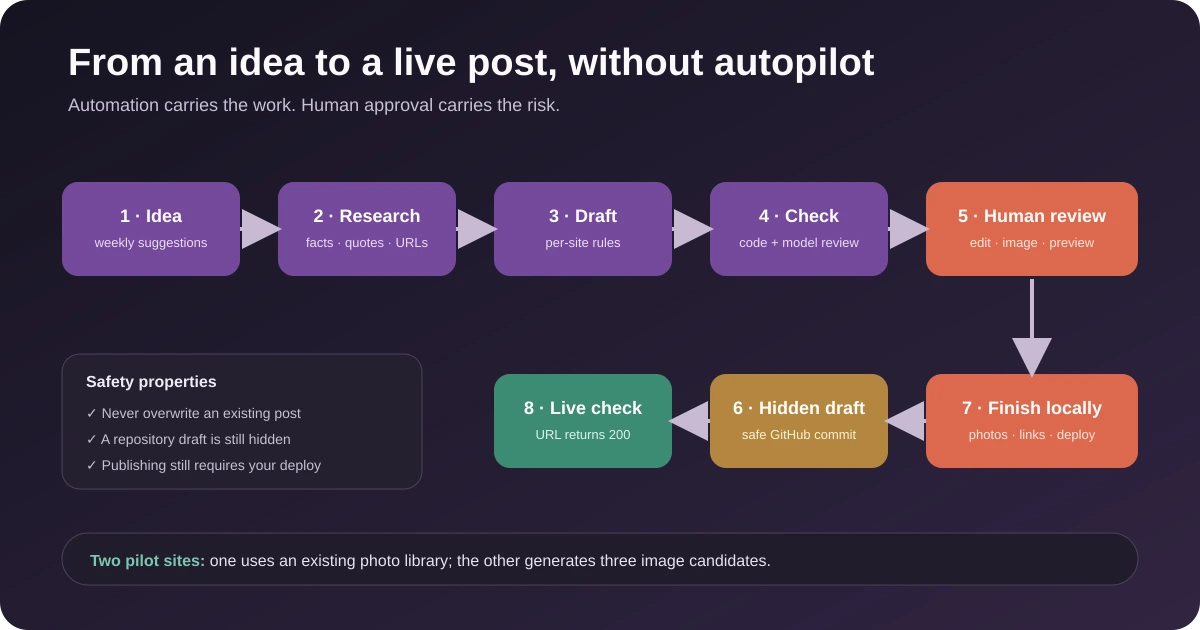
This is the final part of a four-part case study. Start with the project control centre, continue with the human-controlled AI pipeline, or read the production failures and guardrails.
The finished workflow does not publish articles automatically.
That is not a missing feature. It is the central design decision.
The system takes an idea through research, drafting, validation, editorial review, and a safe repository handoff. It removes most of the repetitive preparation while preserving two human gates: I choose what enters the pipeline, and I decide what reaches readers.
Here is how the complete loop works.
1. Ideas arrive as options, not obligations
A weekly agent proposes ideas for each content channel. An idea begins in a “new” state and does nothing until I tap “Send to project.”
That small approval matters. Automatically generating every possible article would spend money, fill the review queue, and turn suggestions into obligations. Selection is the first editorial decision, so it stays human.
The chosen idea moves to the overnight drafter only if its project has an active publishing profile and remains inside the weekly limit.
2. The overnight process advances in stages
At 2:00 a.m., the drafter collects eligible ideas, checks the monthly budget, identifies briefs with weak source material, and submits one batch of outline requests.
A collector runs periodically and advances completed work through the next stage:
- Outline and structured research notes
- Writing with site-specific rules
- Deterministic format and length checks
- Editorial evaluation
- One repair attempt if required
- Image generation or library selection
By morning, a successful draft appears in the dashboard with its score, problems, sources, cost, and image choices.
The process can also end in a visible failure. “Needs sources” is a valid state. A second failed check stops rather than creating an uncontrolled rewrite loop.
3. Review happens in context
A draft should not be judged as raw text alone. The reviewer needs to see why it exists, what evidence supports it, how the checker evaluated it, and how it will look on the target site.
The review page combines those concerns. I can edit the full MDX file, inspect the research, choose or replace the image, and open a site-style preview.
The two pilot sites expose why a generic interface would have failed.
For the espresso publication, the image comes from an established media library. The reviewer can search the library and replace the model’s filename-based suggestion:
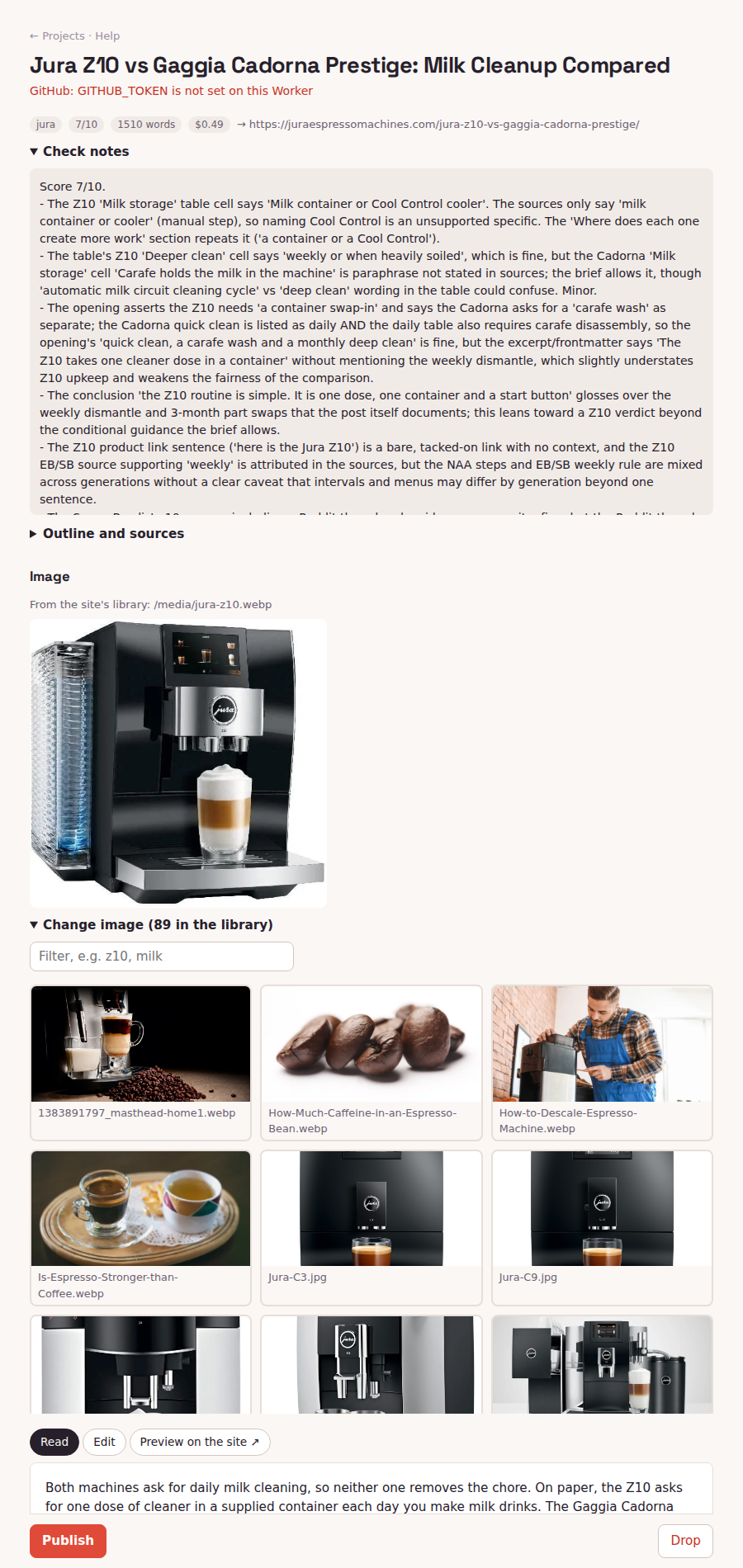
The espresso site reuses real product photography instead of generating new images.
For the halal publication, the draft includes three generated candidates. The reviewer must inspect the product scene and reject garbled labels or accidental brand details.
The preview then places the draft inside the site’s real visual language. It is intentionally marked as a preview and does not pretend that related posts or every dynamic component are exact.
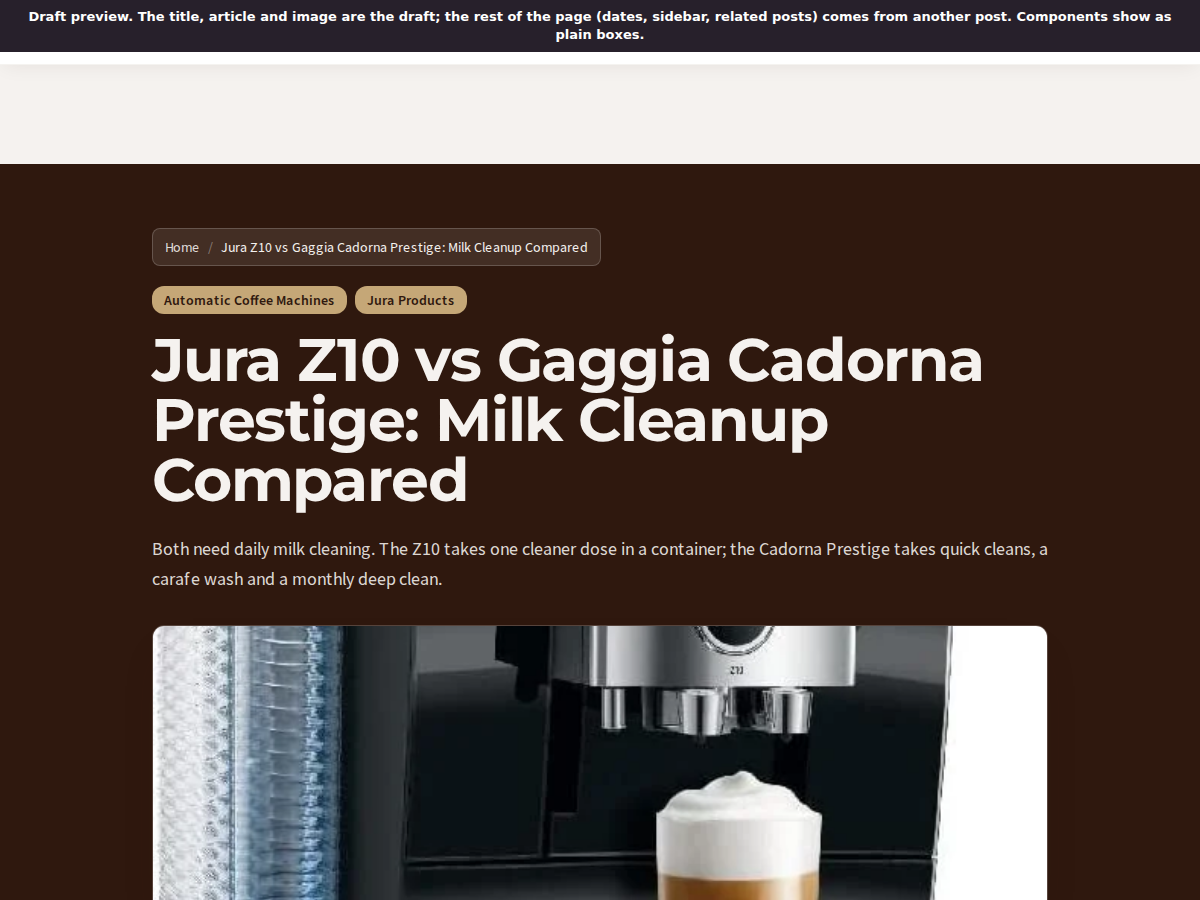
Previewing in the target design catches problems that are invisible in a plain editor.
4. “Send to repo” means hidden draft
The original button said “Publish.” That label was wrong.
The action does not make the article public. It commits one post file, and when required one image file, to the site’s repository with the site’s draft flag enabled.
Renaming the action to “Send to repo as draft” made the safety property clear.
Before committing, the Worker performs several checks:
- The draft must still be in the ready state
- The destination path must not already exist
- Any site-specific counter is reserved safely
- The selected image is loaded from the controlled storage path
- The repository branch is moved without force
If someone else pushes between reading the branch and updating it, the operation fails instead of overwriting their work.
The draft status adds another layer of protection. Even if the site is deployed, the new article remains hidden until its frontmatter is deliberately changed.
5. Final editorial work remains local
After the repository handoff, I pull the site locally and use its actual development environment.
This is where I can add internal links, replace photography, verify calls to action, run the build, set the date, and change the draft status. Then I commit and deploy the site myself.
For these publications, a push to GitHub does not trigger a build. Deployment is a separate command. The workflow therefore has two independent safety gates: the content flag and the deploy action.
That boundary keeps the automated system small. It does not need a copy of every site repository on the VPS, a CI pipeline, or credentials capable of deploying a public site.
6. The loop closes with a live check
The next time the Drafts page opens, it sends a lightweight request to the expected public URL of each committed article.
A successful response moves the draft to “live” and marks the underlying idea as published with its URL. A manual “Mark as live” action remains available as a fallback.
The state chain is now complete:
new idea → selected → drafting → ready → committed as draft → live
At every point, the dashboard can show what happened and what decision comes next.
What the two-site pilot proved
The pilot was useful precisely because the sites were not identical.
| Concern | Espresso publication | Halal publication |
|---|---|---|
| Article format | Astro MDX with product and repair rules | Template-driven MDX with stricter verdict rules |
| Research priority | Manufacturer documentation first | Certifier or regulator sources first |
| Images | Existing media library | Three generated candidates |
| Special validation | Affiliate routes and CTA markup | Claims, identifiers, and article structure |
| Publication | Hidden draft, then local deploy | Hidden draft, then local deploy |
The shared pipeline handles state, batching, review, and repository handoff. The publishing profile handles the differences.
That is the architecture I would reuse when adding another site or adapting the pattern for a client: stable workflow, explicit configuration, and small custom rules where the business actually differs.
What I would measure next
The documented build reached the point where the end-to-end workflow existed and draft review was producing usable work. The next phase should measure operation rather than add features:
- Human review time per article
- Percentage of ideas that fail for weak sources
- Percentage of drafts needing manual structural changes
- Cost per accepted draft
- Image rejection rate
- Build-gate failures after repository handoff
- Published content performance over time
These measurements would show whether the system saves meaningful effort without reducing editorial quality.
What this project demonstrates
The visible result is a content pipeline. The underlying work is broader:
- Translating an operating philosophy into product rules
- Integrating models without giving them unnecessary authority
- Designing state transitions and recovery paths
- Combining probabilistic review with deterministic validation
- Building a useful approval interface
- Protecting repositories, credentials, private pages, and production deployments
- Converting real failures into durable safeguards
That combination is what businesses usually need when they say they want an AI workflow. The model call is only one component. The valuable system is the path around it.
If your team has a repetitive knowledge workflow living across documents, inboxes, spreadsheets, and manual checks, the first step is not choosing a model. It is identifying the decisions, evidence, and failure boundaries the workflow must preserve.
Once those are clear, AI can do a great deal of the preparation without becoming the final authority.
Kashif Aziz · AI Integration
Want this workflow integrated into your product?
I design practical AI features and automation that reduce manual work.