How to Build a Reliable Email Workflow with Cloudflare Email Service
How I verify addresses before sending, track delivery outcomes, and keep dead addresses out of future sends with Cloudflare Workers and Email Service.
I send partnership emails from a custom outreach dashboard built on Cloudflare Workers, Cloudflare Email Service, and Supabase. Email Service was a practical fit because the stack already ran on Cloudflare, and it handles outbound sending from Workers and inbound routing for replies without adding another vendor. The outreach dashboard itself is what supplies the outreach-specific workflow: contact ownership, templates, follow-ups, delivery statuses, and review rules.
The workflow treated an accepted send request as the finish line: the moment Cloudflare accepted the message, the contact was marked Contacted. Bounces and suppression-list hits never made it back into the contact record, so a send that silently failed looked identical to one that landed — until a QA pass surfaced contacts marked Contacted whose addresses were permanently undeliverable.
This post covers that blind spot and the guardrails around it: verify addresses before sending, enforce eligibility at send time, and reconcile delivery outcomes afterward.
What this means for an outreach operator
Cloudflare Email Service provides email infrastructure. It does not decide who should be contacted, whether an address is ready for outreach, when a follow-up is due, or what to do after a bounce. Those decisions belong in the outreach workflow around it.
In practical terms, the workflow needs to answer four questions:
- Before sending: Is this address eligible and worth contacting?
- At send time: Is the person sending it authorized, and is the batch within its limits?
- After sending: Did the receiving mail server accept it, or did the provider report a failure?
- Before the next batch: Should this address remain eligible, require review, or be removed?
An accepted send is not a delivered email
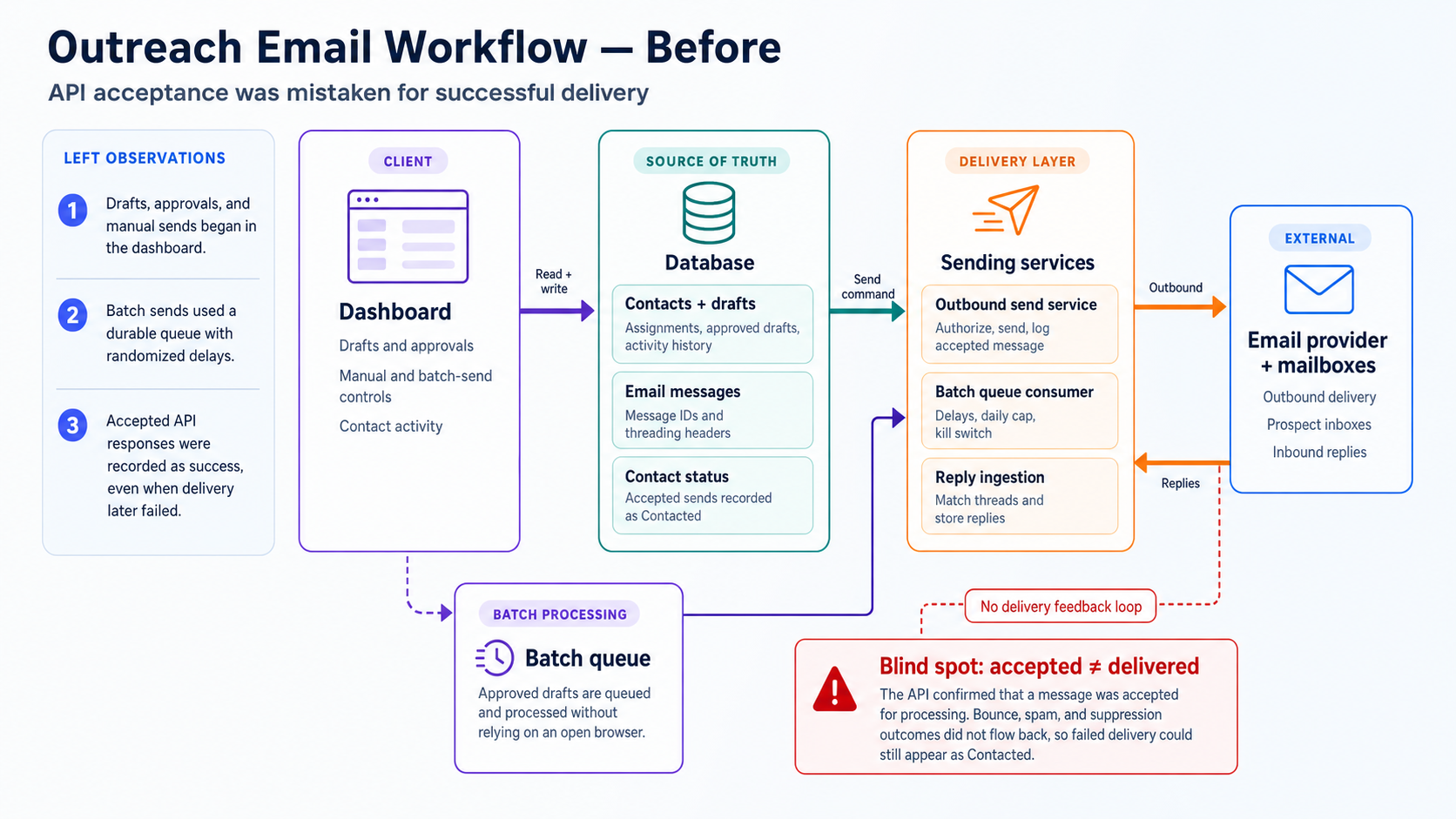
The original pipeline was simple: send the message through Cloudflare Email Service, and if the request completed without throwing, log the contact as Contacted and move on.
But a successful send request only means Cloudflare accepted the request — not that the recipient’s mail server accepted it, and certainly not that it reached the inbox. Without delivery feedback, a “sent” count can overstate reach, a dead address can stay eligible for the next batch, and follow-up timing becomes guesswork. QA proved the point: one Contacted address had failed delivery four times and been auto-suppressed by Cloudflare; another had been shut down entirely (550 5.1.1 User doesn't exist) — and neither record showed a thing.
Part of the problem is vocabulary. “Delivered” often gets used for several different claims, each backed by a different level of evidence. These are the three states that matter operationally:
| Term | What it actually means |
|---|---|
| Accepted | Cloudflare accepted the send request. That’s all a successful send call tells you. |
| Delivered | The receiving mail server accepted the message. This is what the dashboard’s delivered status means, but it does not prove inbox placement or human attention. |
| Bounced or suppressed | The provider reported a delivery failure or blocked the address from future sending. |
The workflow: guardrails around the send
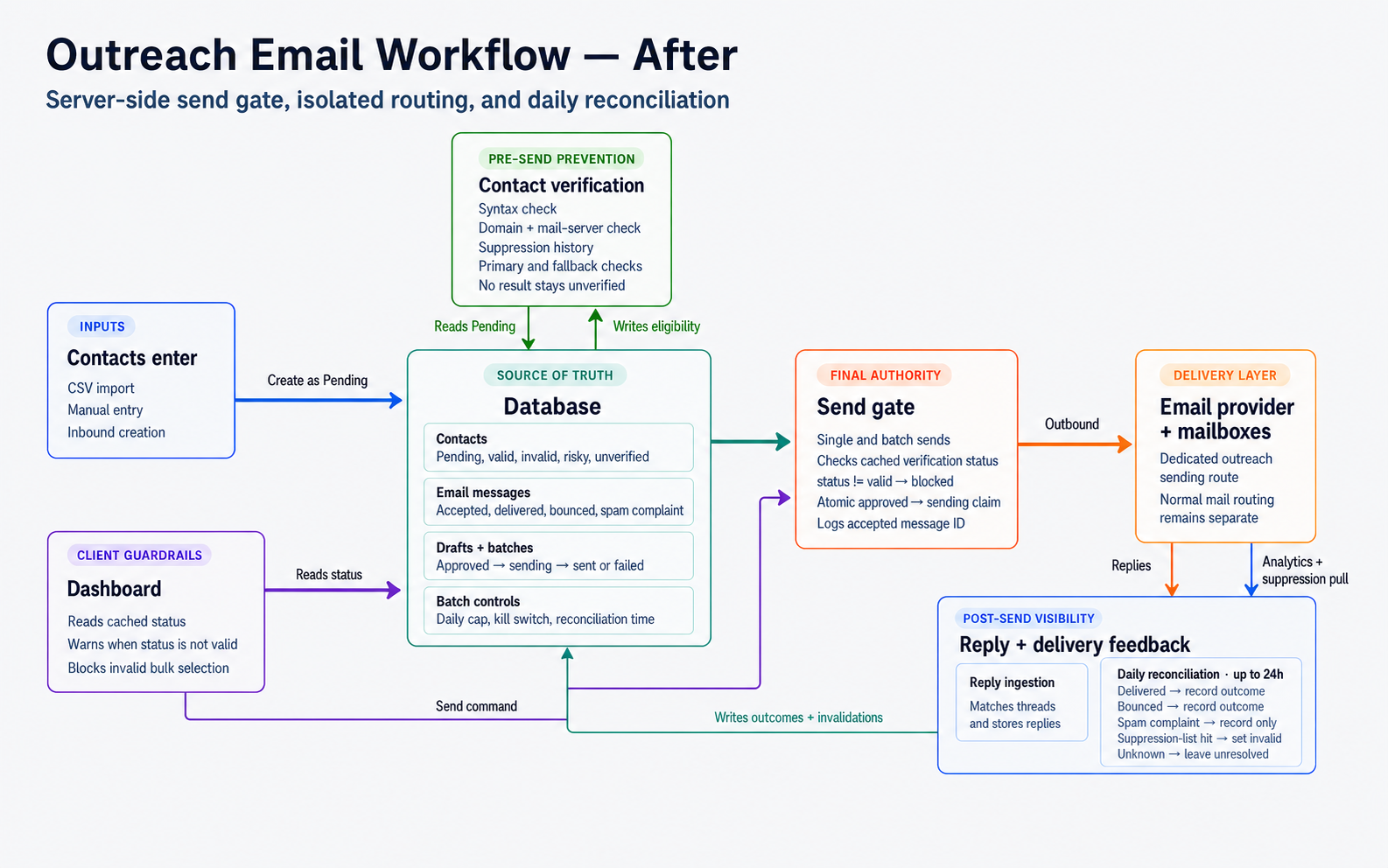
The redesign adds guardrails around the send. The goal is not to make the provider behave like a CRM; it is to make sure the outreach workflow can make a safe decision before and after each message.
Before sending: verify and review
New contacts enter as Pending and can’t be emailed until they pass verification. The system checks the address format, whether the domain can receive email, and whether the address has already failed in the outreach history. Only then does it use a third-party verification service. If that service is unavailable or out of quota, the contact stays unverified and waits for the next sweep instead of being guessed valid.
The main gray area is catch-all domains—mail servers that accept mail to any address without validating individual mailboxes. When a domain behaves this way, verification results may not be enough to confirm whether a specific mailbox exists. Those contacts require a human decision in the dashboard: mark the address verified, mark it invalid, or leave it pending.
Two guardrails sit behind the dashboard: outreach uses a separate sending subdomain, and the server re-checks eligibility, sender permissions, and batch limits immediately before sending.
After sending: update the next decision
A daily job checks provider delivery events and the suppression list, then updates the message status. Hard failures and suppression hits remove the address from future outreach; complaints and uncertain cases are surfaced for review. The exact APIs are implementation details. The operational requirement is that the next batch sees the updated status instead of treating every previous send as equally successful.
Verification reduces avoidable sends, but no workflow guarantees continued deliverability, inbox placement, or human attention. A valid address can go stale, a transient failure can be mistaken for a permanent one, and a dedicated subdomain reduces risk without isolating reputation completely.
The takeaway
The takeaway is that reliable outreach is not about whether the send call succeeds. It is about knowing which contacts are safe to email, preventing accidental sends, and updating the list when delivery fails. Cloudflare Email Service handles the transport; the outreach workflow still has to handle those decisions.
Practical implementation checklist
- Never treat a successful send API response as proof of delivery.
- Verify syntax, MX records, and local suppression history before spending external verification quota.
- Keep uncertain catch-all results in manual review instead of guessing valid.
- Put the final eligibility and authorization check on the server.
- Reconcile provider delivery events and suppression-list data regularly.
- Keep outbound sending isolated on a properly authenticated subdomain.
This workflow is intended for low-volume, manually reviewed partnership outreach. It should still respect applicable anti-spam laws, provider policies, and clear opt-out requests.
Resources
Cloudflare Email Service resources: overview, email authentication, and subdomain setup.
Building a similar outreach workflow?
Connect with me to talk through contact management, delivery tracking, or choosing an email setup that fits your volume.
Tags:
Kashif Aziz · AI Codebase Audit
Need help fixing or hardening this kind of code?
I refactor messy or AI-generated code into maintainable, production-ready systems.