Disposable Software: How I Built a Custom Hiring Dashboard with AI in an Hour
Instead of forcing our hiring process into spreadsheets or off-the-shelf tools, I built a custom dashboard for Tally forms in about an hour with AI, Cloudflare Workers, and D1.

Somewhere in the world right now, a founder is paying $50 a month for an applicant tracking system with 200 features. They use six of them.
I know this because I almost became that founder last week.
We opened a couple of positions at LucidReactor and used Tally forms on the careers page to collect applications. Tally is great at what it does: clean forms, easy embeds, no friction for applicants. But once submissions started coming in, I hit the familiar wall. Tally shows you responses in a list. What I actually needed was a pipeline: who’s new, who’s in review, who’s shortlisted, and where did I write down that note about the candidate with the interesting portfolio?
The old me would have done one of three things: exported everything to a spreadsheet and hated my life, signed up for an ATS trial and drowned in onboarding emails, or duct-taped something together in Notion and abandoned it within a week.
Instead, I opened Claude Code and described what I wanted. About an hour later, I had a working dashboard. Custom-built, deployed, syncing with Tally’s API, and doing exactly what I needed. Nothing more.
That “nothing more” part turns out to be the whole point.
What I Actually Built
Here’s the tool, in plain terms:
- It pulls job applications from Tally via their API, on demand, and stores them in a database
- Every applicant sits in a pipeline: new, in review, shortlisted, hired, or rejected
- I can attach timestamped notes to any application (“strong SEO experience, ask about availability”)
- It handles multiple forms, so each open position gets its own view
- The whole team accesses it through a browser, protected behind Google sign-in
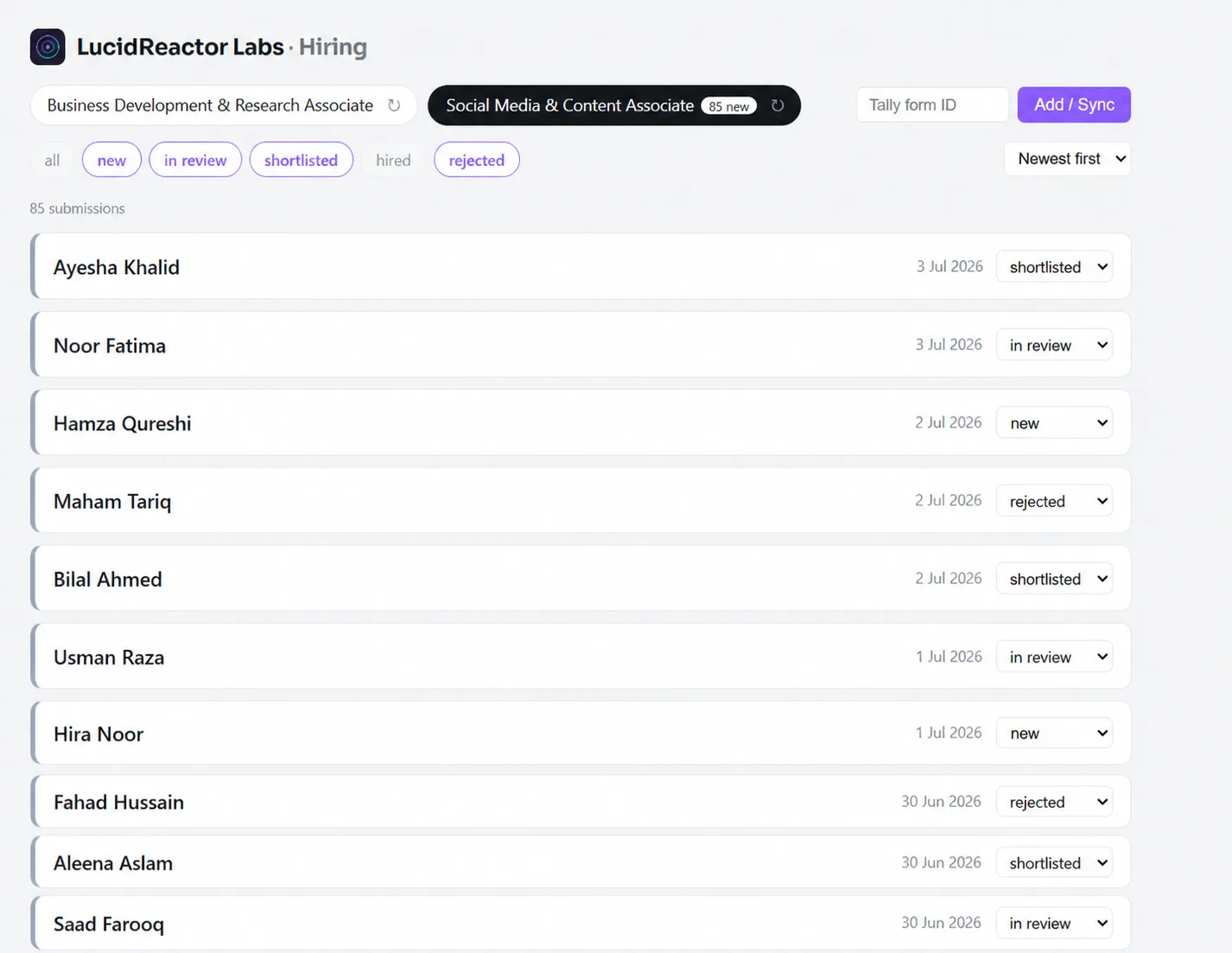
Names have been changed to protect candidate privacy.
Total infrastructure cost: zero. It fits comfortably inside Cloudflare’s free tier. Total build time: roughly an hour, and a decent chunk of that was me deciding what the status labels should be called.
That hour was less time than I would have spent evaluating ATS software or wiring up Notion or Airtable for a hiring workflow.
Few months back, this same tool would have been a weekend project at best. Auth alone would have eaten half a day. Now the expensive part is knowing what you want.
Yes, I Rebuilt Something That Already Exists
Let’s address it directly, because the ghost of every software engineer I’ve ever worked with is screaming at me right now: applicant tracking systems exist. This is a solved problem. You have reinvented a worse Greenhouse.
Correct. Guilty. And I’d do it again.
Here’s the tongue-in-cheek truth about this new era: AI hasn’t just made it easy to build tools, it’s made it easy to build tools that duplicate other tools, which themselves duplicate other tools. Somewhere out there, thousands of developers are prompting their way to thousands of slightly different kanban boards, invoice generators, and habit trackers. The SaaS industry spent a decade consolidating; we’re now un-consolidating it one weekend project at a time. I used to laugh at enterprises running 47 overlapping SaaS subscriptions. Then I looked at my Cloudflare account and realized: I am the tool sprawl now.
But there’s a serious argument hiding inside the joke.
An off-the-shelf ATS is built for the average of ten thousand companies. It has approval workflows I don’t need, compliance modules for jurisdictions I don’t hire in, and an interface designed by a committee that has never met me. The cost isn’t just the subscription. It’s the onboarding, the configuring, the working around opinions baked in by someone else’s product team.
My dashboard has five statuses because my hiring process has five stages. It syncs when I click sync because I don’t need real-time webhooks for a hiring round of this size. It has notes because I take notes. Every feature maps to something I actually do. There’s no drawer of unused functionality quietly justifying a price increase.
The real skill here isn’t blindly building everything yourself. It’s knowing which workflows deserve custom software, which deserve an off-the-shelf tool, and which aren’t painful enough to deserve either.
When software costs an hour instead of a sprint, “build vs. buy” stops being a procurement decision and becomes more like deciding whether to cook or order in. Sometimes you still order in. But you cook a lot more often when the kitchen is this good.
The Founder Math Has Changed
This is the part I care about more than the code.
As founders and operators, we’ve been trained to treat custom software as a luxury. Engineering time is sacred; it goes to the product, never to internal tooling. So we contorted our workflows around whatever combination of spreadsheets and SaaS trials we could tolerate, and we called that discipline.
That trade-off assumed custom tools were expensive. They’re not anymore. The real shift AI brought isn’t that code got faster to write. It’s that a whole category of problems moved from “not worth solving properly” to “solvable before lunch.”
Think about what that unlocks:
Workflows shape themselves around you, not the other way around. My hiring pipeline reflects how I actually evaluate people. When the process changes, the tool changes in minutes.
Trials, onboarding calls, and pricing pages disappear from the loop. The hour I spent building the dashboard is comparable to the time I’d have spent just evaluating three ATS options, and I’d still be paying monthly for the winner.
Tools become disposable, and that’s liberating. If this hiring round ends and I never open the dashboard again, nothing is lost. There’s no annual contract to feel guilty about. Disposable software sounds wasteful until you realize the waste was always the unused subscription, not the small tool that did its one job and retired.
Owning the data is the default. Every application lives in my database, in a plain schema I can query. No export button required, no per-seat charge to give a colleague access.
The enabler mindset here matters more than the technical skill. I didn’t build this because I’m a developer. I built it because I refuse to let an internal workflow problem linger when the fix costs an hour. That attitude is now available to anyone who can describe what they want clearly. The bottleneck has moved from “can we build it?” to “do we know what we actually need?”
The same principle applies after a tool survives its first use. In Building a Lead Generation and Fulfillment System for Services, a conventional CRM had to evolve again because running the service revealed that it was organized around the wrong unit of work.
Where This Goes Sideways (A Word of Caution)
Fairness demands I mention the failure modes, because they’re real.
Disposable tools become permanent infrastructure the moment a second person depends on them. My dashboard has no backups beyond what Cloudflare provides, no tests, and documentation that consists of this blog post. For a hiring round, that’s fine. If I were processing customer payments with it, that would be negligence, and probably the point where you’d want the kind of cleanup and hardening pass that AI-built apps often skip.
There’s also a version of tool sprawl that’s worse than SaaS sprawl: a graveyard of half-remembered workers and databases, each owned by whoever prompted it into existence, none of them written down anywhere. AI makes creation cheap, but it doesn’t make maintenance cheap. Every tool you build is a small pet you’ve adopted.
My rule of thumb is simple: build it yourself when the tool is internal, the data is replaceable or exportable, and the workflow is genuinely yours. Buy it when other people’s money, compliance, or uptime expectations are involved. The hiring dashboard clears the first bar easily. My accounting does not.
Under the Hood: How the Tally Integration Works
For the technically curious, here’s the architecture in brief.
The whole thing is a single Cloudflare Worker with a D1 database (Cloudflare’s serverless SQLite). The worker’s actual backend logic is under 200 lines of TypeScript. The frontend is one HTML file that the worker serves as a static asset, with only requests to /api/* hitting the actual code.
The Tally side needs zero configuration. No webhooks, no Zapier, no middleware. Tally exposes a clean REST API, so the worker just calls the forms and submissions endpoints with a personal API key stored as a worker secret.
Sync is pull-based and incremental. When I click “Sync” in the dashboard, the worker checks D1 for the newest submitted_at timestamp it already has, then pages through Tally’s API. Because Tally returns submissions newest-first, the worker can stop paging as soon as a page contains nothing newer than the last sync point.
Answers are stored schema-free. Tally returns answers keyed by question IDs, so the worker maps each ID to its question title and stores the whole response as a JSON blob (fields_json) per submission. That means I can change the form without needing a database migration.
The database is three tables. forms (id, name, last synced), submissions (id, form, timestamp, the JSON answers, and a status column), and notes (timestamped free text attached to a submission). That’s the entire data model.
The dashboard talks to a handful of small endpoints to list forms, sync submissions, move candidates through the pipeline, and attach notes.
Authentication isn’t even code. This is my favorite part. The worker contains zero auth logic: no login page, no sessions, no password resets. Cloudflare Access sits in front of the worker’s workers.dev URL at the edge, uses Google sign-in, and blocks unauthorized users before my code ever sees the request.
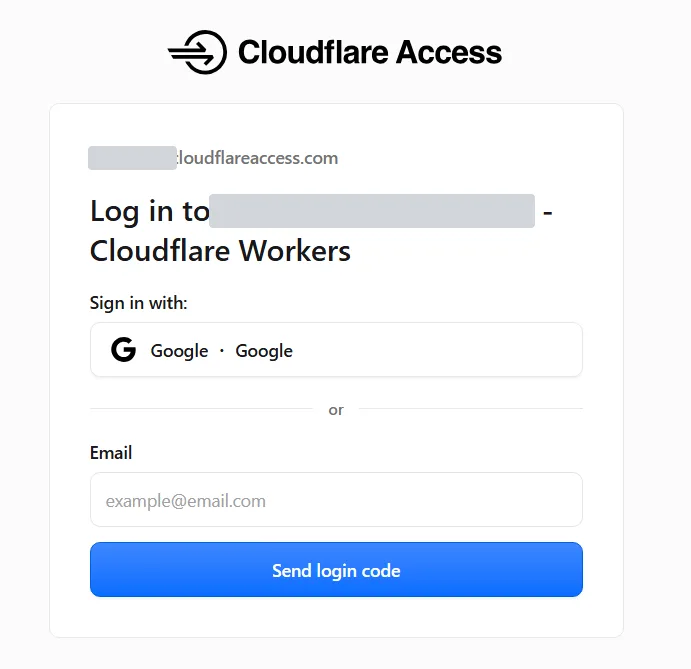
One sharp edge worth knowing: Access protects hostnames, not the worker itself. Every deployment version of a worker can also get its own preview URL, which the Access policy doesn’t cover, so I disabled preview URLs in the worker config with "preview_urls": false. The belt-and-suspenders version would be verifying the Access JWT inside the worker, but for an internal hiring dashboard, edge enforcement plus a closed side door is proportionate.
That’s the complete system. No framework, no ORM, no backend build tooling to configure. The most sophisticated thing in it is the stop-paging-early trick in the sync loop, and Claude wrote that too.
The Takeaway
The interesting shift isn’t that AI writes code. It’s that the minimum viable size of a software project has collapsed. Tools that were never worth building suddenly are, and the people best positioned to benefit aren’t engineers. They’re the founders, operators, and doers who know exactly where their workflow pinches.
So here’s my nudge: pick the most annoying spreadsheet in your life, the one you update grudgingly every week. Describe it to an AI coding tool as if you were briefing a contractor. See what comes back. Worst case, you’ve lost an hour. Best case, you’ve joined the proud, slightly ridiculous ranks of people running their business on tiny custom tools that do exactly one thing well.
And if you end up accidentally rebuilding Trello? Welcome to the club. We meet on a kanban board. Everyone brought their own.
If your team has an internal workflow that’s awkward enough to hurt but not obvious enough to justify enterprise software, that’s exactly the kind of decision I like helping with. Sometimes the answer is build. Sometimes it’s buy. Sometimes it’s fixing the process before touching software at all. If you want a second brain on that call, let’s talk.
Kashif Aziz · AI Codebase Audit
Need help fixing or hardening this kind of code?
I refactor messy or AI-generated code into maintainable, production-ready systems.