Building a CRM That Matches Customers to Local Providers
How I built a CRM that matches repair enquiries to shops by road distance and drafts replies with AI for human review.
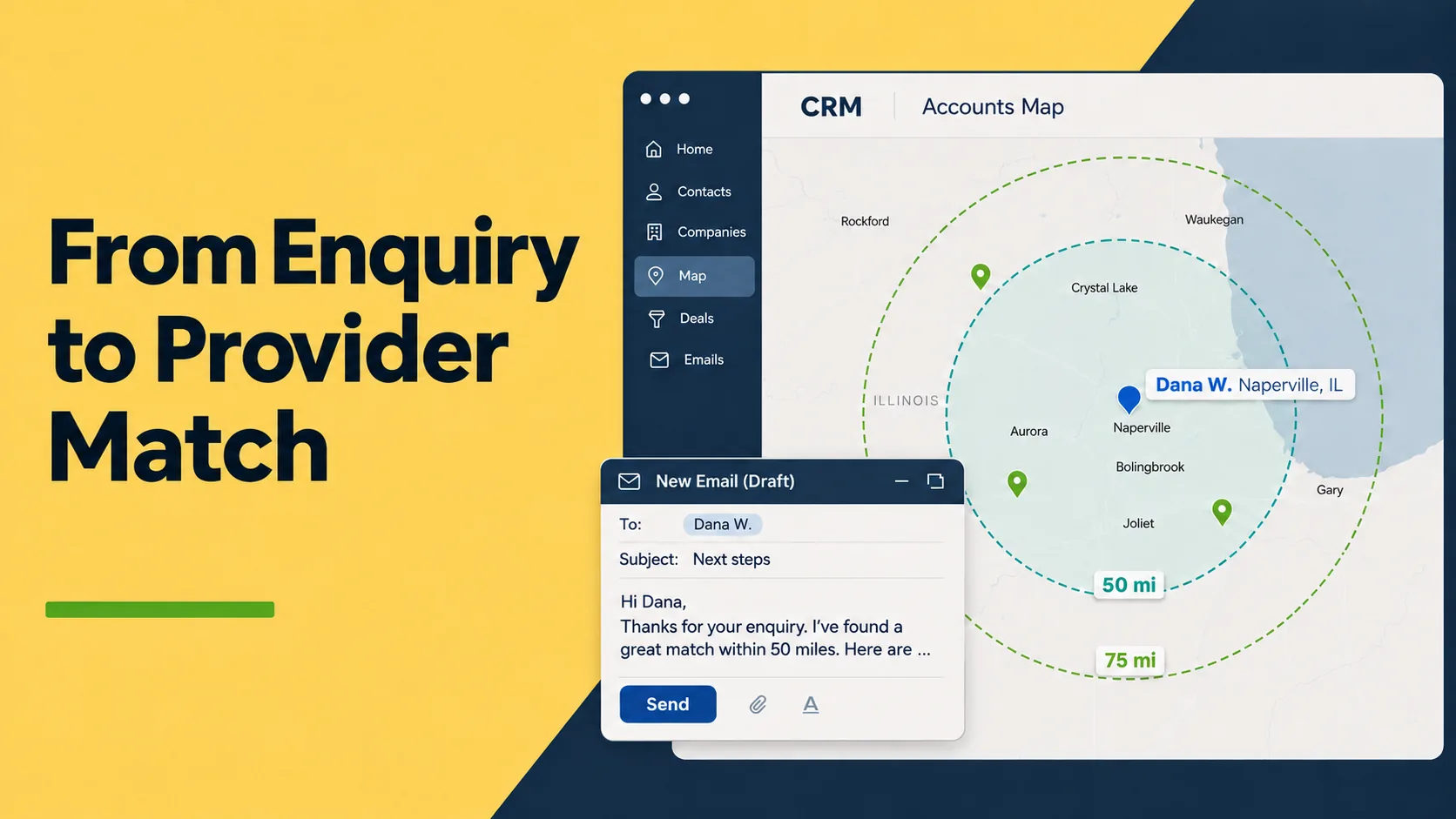
I’m building a CRM for a service that connects equipment owners with independent repair shops. As its product owner, I defined the workflow, set the rules the AI agent follows, and built the tool.
Before the CRM, a new enquiry meant opening several tabs. The operator had to find the customer’s location, search for shops, check driving distances and write to both sides. Then there was the follow-up to remember. Matching by state once sent a customer to a shop 400 miles away.
The challenge was more than finding the nearest shop. A provider might be in the same state but hours away, or close by but unable to collect the equipment. Meanwhile, enquiries went quiet simply because a follow-up was missed.
The CRM brings those decisions into one workflow: mapping customers and providers, matching by road distance and service mode, and preparing replies and follow-ups for the operator to review.
In this article: Location and matching · Road-distance decisions · AI drafts and guardrails · Follow-ups
1. An enquiry arrives
A customer fills in a four-step repair request: what is wrong (model, symptom and the fault in their own words), a few questions about the machine, an optional link to a short video of the fault, and where to reach them, including a ZIP code. The form posts to an email address on the site’s domain.
Cloudflare Email Routing hands the email to a Worker, which parses it and stores it in the database as an inbound message. The setup follows the pattern in my post on building a reliable email workflow with Cloudflare.
An AI agent runs every three hours. It adds new leads to contact cards and drafts replies to new and existing contacts. Section 6 covers what it drafts and the rules it follows.
2. The ZIP code becomes a pin
The card needs a location before it needs anything else.
The CRM cross-references the customer’s ZIP code or town with US Census location data to place an approximate pin on the map. It does the same for providers, so the operator can see where they are in relation to the customer.
Distance, not state lines, is the starting point for every match.
3. Rings, pins and colours
The customer’s card has a Leaflet map with OpenStreetMap tiles. It puts provider selection next to the customer details and the conversation.
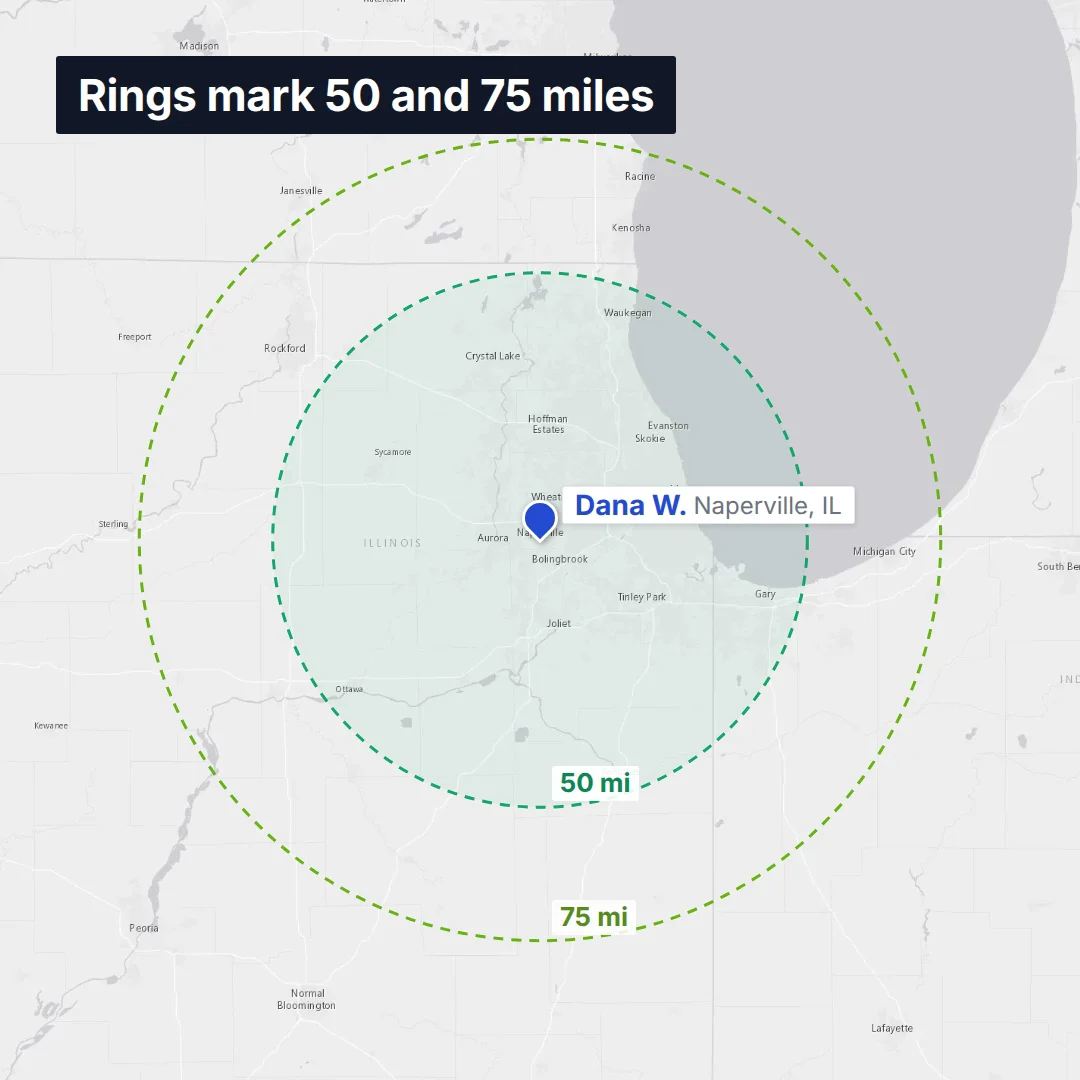
Two dashed rings show straight-line distances of 50 and 75 miles from the customer. The rings are only distance guides. Pin colour is what shows progress.
The nearest twelve providers appear as pins. Each pin’s colour shows the provider’s status on this job:
- Green: an open option, not approached yet.
- Amber: shortlisted, not asked yet.
- Violet: already asked about this job.
Providers already linked to this customer, shortlisted or asked, always show, however far away they are. A line joins each one to the customer: solid for local, dashed for mail-in and dotted for remote. The line gets thicker once the customer chooses that route.
4. Road miles, not straight lines
A straight line on a map shows the shortest distance between two points, but a driver has to follow the roads. That difference can change whether a provider is a practical match.
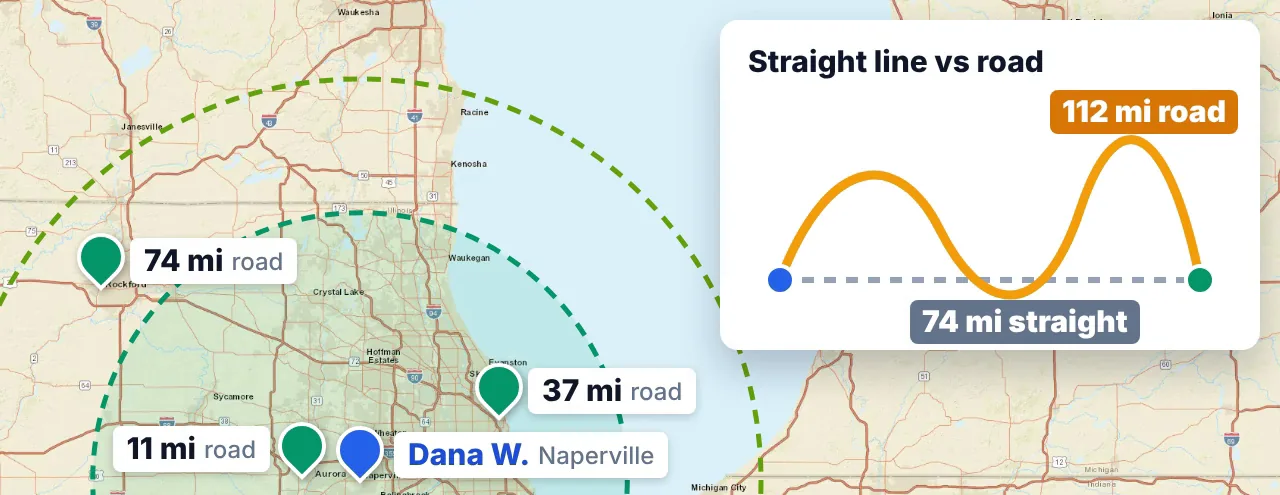
For example, one shop was 74 miles from a customer in a straight line, inside the drop-off ring. By road it was 112 miles.
Decision: match on driving distance, not straight-line distance. The CRM checks road miles to nearby providers and uses them to find local and drop-off options. If routing is unavailable, it falls back to straight-line distance and labels it clearly.
5. From provider selection to introduction
Selecting a provider’s pin opens their details: distance, service modes and progress on this enquiry. A shop that collects and returns equipment may be a better fit than a closer one that only accepts drop-offs.
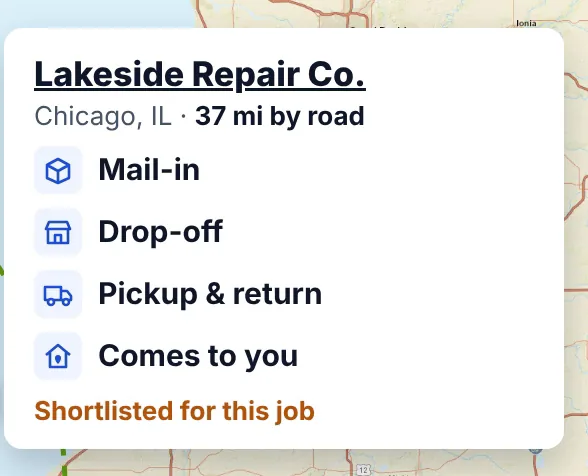
From the same card, the operator can shortlist a provider or prepare an email asking whether they can take the job. The draft includes the customer’s town and a description of the fault. Any missing details stay visible as placeholders.
Decision: contact the provider in a separate thread, not in the customer’s conversation. The customer sees nothing until a shop agrees. Then the operator introduces both sides by email.
6. The agent drafts the first reply
On each run, the agent checks the database for unanswered messages. It prepares draft replies from the agreed communication rules and templates, then sends a run summary through Telegram. I use the same Telegram reporting pattern in my newsletter knowledge base pipeline.
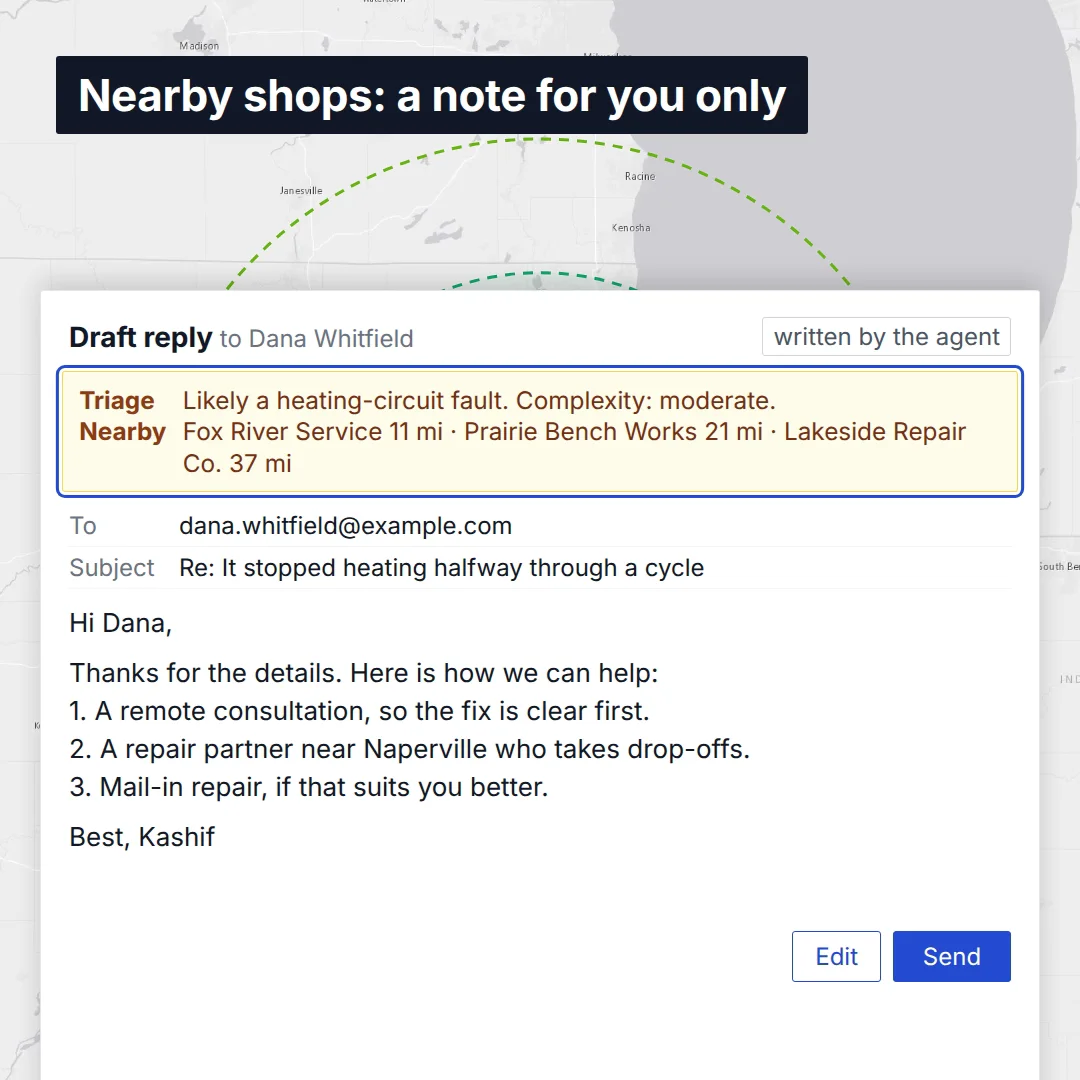
The drafts suggest repair options based on the customer’s location and the available providers.
Decision: drafts only. The operator reviews every outgoing email and sends it from the app.
Two notes come with each draft. They are for the operator, and the email never contains them:
- A triage line: the likely cause, the likely fix and a complexity rating.
- A nearby line: every shop within range, with road miles and status. The model never sees this list. The CRM computes it from the same distance table as the map.
Guardrails, not trust
A validator checks every draft before it is saved. It flags any draft that:
- names a provider,
- quotes a repair price,
- lists a step-by-step repair procedure,
- describes opening the machine, or
- leaves a
[placeholder]unfilled.
Decision: save flagged drafts with a warning instead of rejecting them. Early on, a rejected draft meant writing from scratch. Now the operator gets a starting point, and the amber warning stays visible on top.
Each message goes to the model once. The CRM records the attempt and its outcome, so an unread “needs you” draft is not regenerated every three hours. A failed call, such as an outage, is not recorded and retries on the next run.
7. Follow-ups, referrals and insights
A first reply can leave an enquiry unresolved: the customer may not respond, or the team may still owe them repair options. Following up means checking who needs to act next, then preparing a reminder or flagging the open task.
- Reminders. When a customer has not answered three days after the team’s last email, the agent drafts a short reminder in the same thread. At most two, and still drafts only.
- “We owe” detection. When the team’s last email promised to come back with options, the next move is the team’s. The agent drafts no reminder. It flags the customer to the operator, and the CRM files them as “we owe a reply”, not “waiting on the customer”.
- Card updates. When a customer writes that the machine is fixed or replaced, the agent closes the case and leaves a dated note saying why. It leaves anything unclear for the operator.
The Referrals page follows every job from lead to completion: how many leads connected, how many shops engaged, how many customers went ahead, and which follow-ups are due today. The Insights page shows where enquiries come from (by state, by lead page, by model and by symptom) and which of them turn into jobs.
The referral side builds on the lead generation and fulfillment system behind this service, and on lessons from turning a single-file outreach tool into a team CRM.
What changed in practice
| Before | After |
|---|---|
| Several tabs per enquiry: maps, shop search, distance checks, email | One customer card with the map, providers, conversation and drafts |
| Matching by state, which once meant a shop 400 miles away | Matching by road miles and service mode |
| Every reply written from scratch | A reviewed draft with a triage note and nearby shops |
| Follow-ups depended on memory | Reminders drafted on schedule, and “we owe a reply” flagged |
The agent prepares replies and reminders on its scheduled runs. The operator reviews the information, chooses a provider and sends each email.
The next question is whether more consistent follow-up helps more enquiries become completed jobs. The Referrals and Insights pages give a way to track that outcome.
Lessons
- Design around the next decision. Bringing provider details, distance and conversation history together helps the operator choose a route and act on it.
- Make responsibility explicit. A quiet enquiry may need a customer reminder or action from the team. The workflow needs to distinguish between the two.
- Automate preparation with review in mind. Drafts, internal notes and visible warnings give the operator a starting point while keeping outgoing messages under their control.
The work continues around a practical question: what does the team need to move an enquiry forward? That question guides which information belongs on the card, which tasks the agent prepares, and where a person makes the call. It is also the starting point I use when helping teams turn a manual service workflow into a useful internal tool.
Tags:
Kashif Aziz · Technical Consulting
Have a manual service workflow that needs a proper tool?
I help service businesses map the decisions their team makes every day, then build the internal tool that puts the right information in front of them, with AI doing the preparation and people making the call.